5 minute read
There’s a bot for that
Eleven new fediverse accounts that post what FediDB sees: charts of the network, new software, new large servers, release adoption and the projects growing fastest.

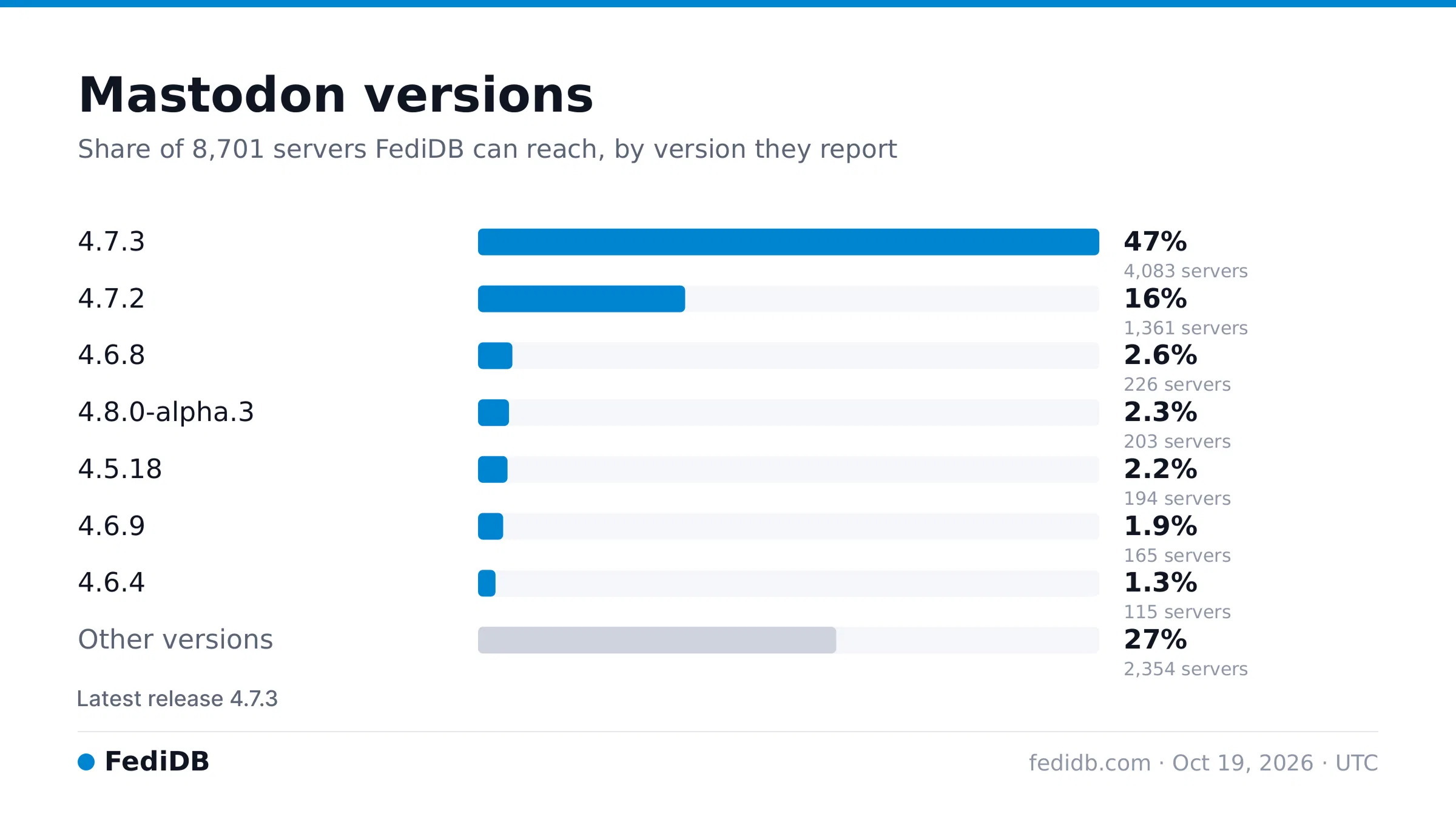
FediDB has always been a place you visit. You open the site, look up a server or a piece of software, check a chart, and leave. That works when you know what you’re looking for. It doesn’t help with the things you didn’t know to look for: the new project that showed up on a handful of servers last week, or the release half of Mastodon upgraded to over the weekend.
So we’re bringing FediDB to your timeline. Starting today, eleven bots post what FediDB sees, and you can follow them from any fediverse app. One of them even answers your questions.
The big picture
@[email protected] posts a chart of the whole network twice a day, at 09:00 and 21:00 UTC: servers, accounts and monthly active accounts over the last 30 days, with how much each changed in the past week.
@[email protected] posts every Monday and Thursday with the software growing fastest, measured in servers compared with about a month ago. Only projects with at least 20 servers count, so one new server can’t make something look like it doubled overnight.
@[email protected] celebrates round numbers: every 1,000 servers, million accounts and 100,000 monthly active accounts across the fediverse, plus milestones for each project with at least 10 servers, like 500 servers or 100,000 accounts. A count has to stay past the line for six hours before it posts, so a crawl hiccup never gets announced as a milestone.
@[email protected] sums up the week every Monday at 15:00 UTC: how the network changed, the week’s releases, new software and apps, listing updates and blog posts, all in one post with a chart of the releases. If you only follow one bot, make it this one.
What’s new
@[email protected] posts new stable releases of fediverse software as they come out, for any project running on at least 10 servers. Each post says whether it’s a security release, what changed, how many servers already run it and where to read the release notes.
@[email protected] picks one project a day and charts which releases its servers run. It works through the 12 most used fediverse projects, so every day is a different one. If the project publishes releases, the post also says how many servers are on the latest one.
@[email protected] tells you when FediDB starts seeing new software. Once a project shows up running on a server we can reach, the bot posts what it is, where it’s running and a link to its page. It posts at most three a day, so a busy week won’t flood your timeline.
@[email protected] posts when FediDB finds a new server that already has more than 1,000 accounts. Big new servers are usually a sign of something: a community moving, a new regional home, or a project growing fast.
@[email protected] introduces apps as they’re added to FediDB, with the app’s icon and screenshots, which platforms it runs on, what it costs and who makes it.
A little history
@[email protected] looks back every day at 13:00 UTC. It posts what happened on that date in past years: standards milestones like ActivityPub becoming a W3C Recommendation, major releases, the day FediDB started tracking a project, and how much bigger the network is than a year ago, with a chart comparing every year we have numbers for. Every history entry is checked against a source that states the exact day.
Ask FediDB
@[email protected] answers questions. Mention it in a public post or send it a direct message and it replies with FediDB data. Try:
@[email protected] how many servers are there?@[email protected] pixelfed@[email protected] latest mastodon release@[email protected] lemmy vs piefed@[email protected] biggest servers by active users@[email protected] mastodon.social
Replies are unlisted, so they show up in your thread without landing on anyone’s timeline. It doesn’t answer other bots or followers-only posts, takes a few questions an hour from each account, and bows out after a few replies in one thread. Servers that have opted out of FediDB get the same answer as servers we’ve never seen.
We don’t keep what you asked. To answer each question once and keep things fair, @ask notes who asked and what kind of question it was, never the text, and that note is deleted after 30 days.
Every bot has a page
Each bot has its own page on FediDB with its posts, its followers and when it posts. You can see them all at fedidb.com/platform/bots. Every post has its own page too, with a link you can paste into your app to reply, boost or quote. @ask’s answers have their own Replies tab, so they don’t crowd out the posts.
Followers who turned off discovery on their accounts are counted but not listed, the same as on the blog. The same goes for @ask: if you turned off discovery, its reply to you is shown without your name.
Built the FediDB way
These are ordinary fediverse accounts, so you follow them the way you follow anyone else. They don’t follow you back, read your timeline or track anything about you. The only one that ever replies is @ask, and only when you talk to it first.
The charts are drawn on our own server from the same data as the rest of the site. No third-party charting service sees anything. Every chart comes with a written description, so screen reader users get the same numbers as everyone else.
If you have an idea for a bot, or something one of them got wrong, send it a direct message. It reaches the FediDB team.
One more thing
You can now sign in to FediDB with a code sent by direct message. Enter your handle on the sign in page and @[email protected] will send you a one-time code. It works with any fediverse software that can receive a direct message, so servers that don’t support app sign in can still edit the wiki and manage their listings.
On Mastodon, private mentions from accounts you don’t follow land under filtered notifications, so look there if the code doesn’t show up, or follow @[email protected] first.
Stay awesome, thanks for reading!